








































SQL for Data Analytics: A Complete Guide
Master SQL for data analytics with our complete step-by-step guide. Learn queries, joins, and advanced techniques to turn raw data into any actionable insights.
What if you're overlooking crucial insights while others leverage data to move forward? Today's businesses generate vast amounts of data every second, from social media interactions and website traffic to sales transactions and customer contacts. This data can answer key questions such as: Which products are selling best? Which advertising strategies are driving revenue? Where is your team losing time and money due to inefficiencies?
The challenge is that raw data is essentially useless on its own. Without the right tools, extracting relevant insights accurately and efficiently is nearly impossible. This is where SQL for data analytics comes into play. By effectively organizing, filtering, and analyzing large datasets, SQL enables you to make informed decisions more quickly by transforming chaotic statistics into clear and actionable insights.
Whether you work as a business analyst, marketer, or aspiring data professional, learning SQL is essential to maximizing your data's potential and maintaining your competitive edge in the marketplace.
What is a Database?
A database is an organized set of data created for effective management, retrieval, and storage. Relational databases, which arrange data into tables with rows and columns to preserve relationships and guarantee data integrity, are frequently used in analytics.


Key Concepts
-
Tables: Large datasets may be easily accessed, organized, and managed effectively due to tables, which systematically contain data in rows and columns.
-
Primary Key: Each row in a table is uniquely identified by its primary key, which guarantees that there are no duplicates and consistently preserves data integrity.
-
Foreign Key: By establishing connections across tables, a foreign key ensures referential integrity between datasets.
-
Normalization: By grouping data into relevant tables, normalization lowers redundancy, stops abnormalities, and enhances the overall consistency and efficiency of databases.
Understanding these fundamental ideas helps in your comprehension of data structure, table relationships, and effective information querying and retrieval.
What is SQL?
The common language for working with relational databases is called SQL, or Structured Query Language. In short, it enables you to interact with a database in order to obtain, arrange, and work with data. SQL is the technology that transforms raw data into insightful information, whether you're creating reports, following sales trends, or analyzing customer behavior.
Before being abbreviated, SQL was known as SEQUEL (Structured English Query Language) and was created in the early 1970s by IBM researchers Donald D. Chamberlin and Raymond F. Boyce. For professionals who wish to make data-driven decisions, SQL for data analytics is now a fundamental competency. In almost every business, its ease of use, adaptability, and strength have made it the preferred language for data management and comprehension.
The Importance of SQL in Data Analytics
Converting unprocessed data into insights requires SQL. Professionals who understand the importance of data analytics are better able to make judgments and effectively extract value from complex datasets.
1. Quick Data Retrieval
Teams can save time and concentrate on important business decisions by utilizing SQL to swiftly retrieve and arrange vast amounts of data.
2. Combine Multiple Sources
Analysts can integrate data from several sources using SQL to create a comprehensive image that makes trends and patterns easy to see.
3. Summarize Key Metrics
Aggregation and filtering are supported by SQL, which facilitates information summarization and the identification of important metrics for more intelligent decision-making.
4. Automate Repetitive Tasks
You may decrease errors brought on by human data handling, automate repetitive activities, and generate reports reliably with SQL.
5. Enhance Problem Solving
Proficiency in SQL enhances problem-solving abilities, allowing experts to delve deeper into datasets and find insights that others might overlook.
6. Seamless Tool Integration
SQL may be seamlessly integrated with contemporary analytics tools and dashboards to effectively see, evaluate, and act upon corporate data.
Must-Know SQL Concepts for Aspiring Data Analysts
It is essential for any professional to comprehend the fundamentals of SQL. These fundamental concepts are necessary for every data analyst to effectively manage, examine, and interpret datasets.
1. Tables and Records
Each row in a table represents a record, and tables contain data in rows and columns. SQL enables efficient information management, access, and organization for analysis.
2. Data Types and Values
Certain data kinds, such as dates, text, or integers, are stored in columns. Understanding types guarantees that computations and queries produce accurate results and helps to preserve correctness.


3. Primary and Foreign Keys
Foreign keys connect tables together, but primary keys uniquely identify each record. These keys support data integrity and dataset fusion.
4. SQL Syntax Basics
You may access and filter data with the help of commands like SELECT, FROM, and WHERE. You can swiftly respond to important business questions with simple queries.
5. Aggregations and Grouping
Data is summarized via functions like SUM, COUNT, and GROUP via. Aggregations facilitate the effective analysis of averages, totals, and trends across several categories.
6. Sorting and Filtering Data
Results can be filtered and additional information can be removed using the WHERE and ORDER BY clauses. As a result, analysis becomes more lucid and concentrates on key points.
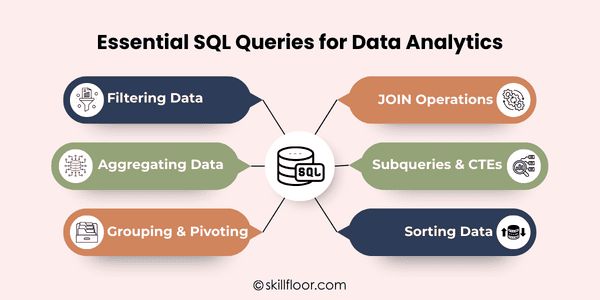
Essential SQL Queries for Data Analytics
Professionals are able to obtain insights and make better business decisions by using SQL queries to rapidly extract, organize, and analyze data.
1. Filtering Data: Narrowing Down Specific Rows
Using SQL criteria to filter data allows you to concentrate on just the information you require. WHERE, BETWEEN, IN, and LIKE are common clauses that provide you with exact control over the collection.
-
WHERE: Select rows that meet a specific condition.
-
BETWEEN: Select rows with values within a specific range.
-
IN: Select rows that match any value in a list.
-
LIKE: Select rows that match a specific pattern.
2. Aggregating Data: Summarizing Large Datasets
By summarizing data, aggregation functions help in the comprehension of general metrics and patterns. SQL provides helpful summaries through the use of functions like COUNT, SUM, AVG, MIN, and MAX.
-
COUNT: Counts the number of rows in a dataset.
-
SUM: Calculates the total value of a numeric column.
-
AVG: Finds the average value in a dataset.
-
MIN: Retrieves the smallest value in a column.
-
MAX: Retrieves the largest value in a column.
3. Grouping & Pivoting: Organizing Data by Categories
Rows can be arranged into relevant categories using GROUP BY and HAVING, and custom conditions can be created for deeper insights using CASE statements.
-
GROUP BY: Groups rows sharing the same value for analysis.
-
HAVING: Filters groups based on conditions after aggregation.
-
CASE: Creates custom categories or conditional outputs for reporting.
4. JOIN Operations: Combining Data from Multiple Tables
Multiple tables are frequently used to hold data. On the basis of similar columns, JOIN operations combine this data. INNER, LEFT, RIGHT, and FULL JOINs are common varieties.
-
INNER JOIN: Retrieves only rows with matching values in both tables.
-
LEFT JOIN: Retrieves all rows from the left table with matching right-table rows.
-
RIGHT JOIN: Retrieves all rows from the right table with matching left-table rows.
-
FULL JOIN: Retrieves all rows from both tables, matched or unmatched.
5. Subqueries & CTEs: Breaking Complex Queries
Large queries are easier to read and maintain when subqueries and CTEs are used to break down difficult SQL processes into smaller, more manageable steps.
-
Subqueries: Queries within another query to calculate intermediate results.
-
CTEs: Temporary named result sets used to simplify complex queries.
6. Sorting Data: Ordering Results Effectively
Sorting enables you to use ORDER BY to arrange query results in a sensible order. It can be either descending (DESC) or ascending (ASC).
-
ORDER BY ASC: Sorts data from smallest to largest.
-
ORDER BY DESC: Sorts data from largest to smallest.
Advanced SQL Techniques for Analysts
Analysts can deal with large datasets, find trends, and use data analysis to make more accurate conclusions due to advanced SQL techniques.
1. Window Functions
Window functions, including sorting, running totals, and moving averages, carry out computations across several rows, facilitating effective trend analysis.
2. Common Table Expressions (CTEs)
For advanced data activities, CTEs generate temporary named result sets that facilitate the reading, management, and maintenance of complex searches.
3. Subqueries
Subqueries are inquiries inside other searches that enable filtering or intermediary computations to draw significant conclusions from big datasets.
4. String Functions
String functions modify text data by extracting, replacing, or trimming portions, improving the accuracy and cleanliness of reporting and analysis.
5. Date Functions
Date functions assist effectively examine trends across days, months, or years by extracting, comparing, or calculating intervals.
6. Query Optimization
Indexing, effective joins, and structured queries are all used in query optimization to speed up SQL procedures and decrease execution time.
SQL for Data Analytics: Practical Examples and Use Cases
SQL transforms raw statistics into actionable intelligence that produces tangible business results across industries by assisting professionals in deriving significant insights from data, spotting trends, and making well-informed decisions.
1. Sales Analysis: Tracking Revenue and Performance
SQL enables you to track revenue trends over time, find top-selling products, evaluate sales data, and spot seasonal patterns. These insights enhance marketing tactics, maximize inventory, and boost overall company performance.
2. Customer Segmentation: Understanding Your Audience
Customers can be grouped using SQL according to their demographics, past interactions, or purchasing patterns. Targeted marketing efforts, customized offers, and tactics to raise client retention and lifetime value are made possible by this segmentation.
3. Financial Reporting: Accurate Revenue and Expense Tracking
SQL aggregates data from several sources to make monthly revenue, cost, and profit margin calculations easier. To help with forecasting, budgeting, and strategic financial decision-making, analysts can produce precise and timely reports.
4. Website Analytics: Enhancing User Experience
SQL is useful for tracking page visitors, measuring conversion rates, and analyzing website traffic. Teams can optimize navigation, boost user experience, and improve website speed with the help of the insights gathered from these requests.
Integrating SQL with Other Analytics Tools
Professionals may effectively extract, analyze, and visualize data thanks to SQL's easy integration with contemporary technologies. Using SQL in conjunction with data analytics tools improves decision-making and insights.
1. Business Intelligence Dashboards
Tableau, Power BI, Looker, and Excel dashboards are powered by SQL queries, which swiftly transform unprocessed data into visual insights for improved decision-making.
2. Automated Reporting
SQL can plan queries to provide automated, consistent reports, saving managers and teams time while guaranteeing accurate and trustworthy data.
3. Data Cleaning and Transformation
In order to prepare raw datasets for further investigation, visualization, and predictive analytics, SQL assists in cleaning, filtering, and transforming them prior to analysis.
4. Integrating with Python and R
Advanced statistical analysis, machine learning models, and dynamic visualizations are made possible by SQL's ability to get data into Python or R.
5. Connecting Multiple Data Sources
SQL may create a single dataset that offers a thorough picture for analysis by combining data from databases, spreadsheets, or APIs.
6. Real-Time Analytics
SQL queries can execute on live databases, providing real-time insights for tracking activities, keeping an eye on performance, and assisting with quick business decisions.
Understanding your data like never before is possible when you master SQL for Data Analytics. It enables you to find patterns, streamline disorganized datasets, and make better decisions more quickly. You can confidently examine complex data, produce insightful reports, and provide a definitive response to important business concerns when you utilize SQL for Data Analytics. These skills are useful for every professional who wishes to maintain their competitiveness. By using SQL for Data Analytics in practical situations, you may increase productivity and gain insights that spur expansion, enhance tactics, and make your work genuinely meaningful.
Digital Marketing Courses in Other Locations in India
Ahmedabad | Aurangabad | Bangalore | Bhilai | Bhopal | Bhubaneshwar | Chandigarh | Chennai | Cochin | Coimbatore | Dehra Dun | Delhi | Faridabad | Ghaziabad | Gorakhpur | Guntur | Gurgaon | Guwahati | Hyderabad | Jaipur | Kanpur | Khammam | Kolkata | Lucknow | Madurai | Mumbai | Mysore | Nagpur | Noida | Patna | Pondicherry | Pune | Ranchi | Shimoga | Surat | Thane | Thiruvananthapuram | Tiruchirappalli | Tirupati | Vadodara | Visakhapatnam | Warangal | Jalandhar | Jodhpur | Indore | Durgapur | Jamshedpur | Dhanbad | Kota | Karnal | Udaipur | Amritsar | calicut | Nashik | Ludhiana | varanasi | thrissur | Mangalore | Raipur |