












































Power BI vs Tableau: Which Is Better for Data Analysts?
Explore Power BI vs Tableau for data analysts. Compare features, performance, pricing, and advanced visualization tools to choose the right BI tool for career.

In the world of data analytics, it’s important to stay up-to-date! Choosing the right business intelligence tool can be challenging due to the wide range of options available. Two of the most popular choices are Power BI and Tableau, each with unique features that serve different purposes.
Understanding these tools is crucial for anyone entering the field of data analytics. Power BI is ideal for creating quick dashboards and offers excellent integration with Microsoft products, while Tableau is better suited for handling complex datasets and creating dynamic visualizations. By recognizing these differences, analysts can make more informed decisions more quickly and save time in their work.
Overview: What Are Power BI and Tableau?
Before diving into comparisons, it’s essential to understand what these tools are:
Power BI


Power BI is a cloud-based business intelligence solution developed by Microsoft to simplify data analysis and visualization. Due to its strong integration with Excel, Office 365, and Azure, it is an attractive option for businesses that have already invested in the Microsoft ecosystem.
Tableau
On the other hand, Tableau is renowned for its interactive dashboards and advanced visualization capabilities. It allows analysts to explore data from multiple perspectives and create complex, visually appealing reports. Tableau is popular among organizations that prioritize analytics because of its flexibility and powerful visual storytelling features.
Comparison Matrix: Power BI vs Tableau
1. Ease of Use & Learning Curve
Power BI: Familiar, Friendly, Fast
Power BI feels familiar to those who are already familiar with the Microsoft ecosystem, which includes Teams, Excel, and Azure. Analysts can get started quickly because of its drag-and-drop interface, user-friendly dashboards, and pre-built templates.
-
Beginner-friendly: Excellent for analysts leaving Excel.
-
Integration perks: Direct access to Microsoft applications, SharePoint, and SQL.
-
Quick wins: Create reports and dashboards in a matter of hours rather than days.
Tableau: The Creative Powerhouse
Tableau is like an empty canvas on which to paint your data ideas. Because of its unmatched visual analytics capabilities, analysts can create dynamic dashboards that convey a compelling tale.
-
Steeper learning curve: Takes longer to get proficient with sophisticated features.
-
Stunning visuals: Perfect for presenting data and corporate presentations.
-
Flexible: Connects to on-premises or cloud data sources almost anyplace.
Bottom line: Power BI is the obvious choice for speed and familiarity. Tableau, however, is the best option if you're interested in interactive dashboards, visual creativity, and storytelling.
2. Data Visualization & Dashboard Impact
The dashboards of data analysts are their lifeline. A dynamic, interactive visualization that illustrates trends, anomalies, and possibilities in a matter of seconds is far superior to a static spreadsheet.
Tableau shines here:
-
Advanced chart types and interactive visuals
-
Real-time analytics with drill-down capabilities
-
Customizable dashboards for different audiences
Power BI is no slouch:
-
Excellent for standard visualizations and KPI tracking
-
Rapid deployment for recurring reports
-
Growing library of custom visuals
Example: Consider reporting sales results to management every quarter. With Tableau, you can make a dynamic dashboard that lets executives delve into product lines, click on regions, and quickly find hidden trends. Although its visual refinement may feel more "business standard" than cinematic, Power BI is also capable of doing this.


3. Data Connectivity & Integration
The seamless integration of your BI solution with your current tech stack is essential in today's linked world to guarantee effective analytics, seamless data flow, and actionable insights across all platforms.
-
Power BI: Smooth interaction with Excel, SQL Server, Azure, and Microsoft tools. Perfect for businesses that have already made investments in the Microsoft ecosystem.
-
Tableau: Provides more extensive connectivity through APIs, cloud services, and databases. ideal for various sources and complex data contexts.
Analyst insight: If your business has large datasets or uses multiple platforms, Tableau allows you to harmonize data without any restrictions. Power BI functions well in environments that are already heavily reliant on Microsoft.
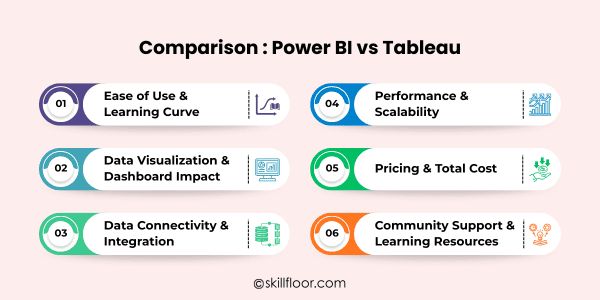
4. Performance & Scalability
Slow dashboards are a common problem for analysts, particularly when managing millions of rows of data. This emphasizes the significance of data analytics in providing precise, fast business insights.
-
Power BI: With small to medium-sized datasets, Power BI shines, providing effective dashboard design and reporting. Although performance is improved by premium tiers, particularly massive data models may still occasionally lag and process more slowly.
-
Tableau: Tableau provides quick, interactive dashboards and is suited for big datasets and intricate computations. Because of its performance, it's perfect for large workloads and enterprise analytics, guaranteeing accurate insights at scale.
Tip: Don't underestimate how frustrating slow dashboards may be. The necessity for effective, responsive BI solutions is highlighted by the fact that poor performance can cause stakeholders to get frustrated, postpone important decisions, and undermine confidence in your reports.
5. Pricing & Total Cost of Ownership
Whether you are managing a team or working as an analyst alone, budgeting is essential. Costs, scalability, and long-term business value are all impacted by selecting the appropriate BI solution.
-
Power BI: Power BI is perfect for startups, small teams, and enterprises looking for effective, cost-effective BI solutions since it provides an inexpensive subscription model with a lower total cost of ownership.
-
Tableau: Tableau has more expensive licensing prices, especially for enterprise deployment, but these expenses provide access to strong BI features for large-scale operations, configurable dashboards, and advanced analytics capabilities.
Subtle FOMO: Tableau experts frequently land more in-demand positions, drawing attention in cutthroat marketplaces. Many Power BI users can miss out on critical projects and career possibilities due to its premium placement.
6. Community Support & Learning Resources
Staying current and learning new things fast are essential for data analysts. Ongoing development, access to best practices, and quicker resolution of real-world problems are all guaranteed by strong community support.
-
Power BI: There are a lot of training, forums, and material available in the sizable Microsoft-driven Power BI community. Analysts may use peer support, exchange ideas, and discover answers fast to develop dashboards effectively.
-
Tableau: Tableau provides an active forum, a robust worldwide community, a Tableau Public gallery, and a wealth of free resources. Through the use of real-world dashboard examples, analysts can stay inspired, explore concepts, and master sophisticated approaches.
Analyst insight: In addition to saving time, a thriving community can create innovation and hasten professional advancement. Participating in forums and finishing a data analytics course enhances abilities, making learning more useful and significant.
Features of Power BI
Power BI is a complete business analytics tool with several functions to assist users in sharing, analyzing, and visualizing data. Among Power BI's essential components are the following:
-
Interactive Visualizations: Insights may be explored in a variety of ways using Power BI, including interactive data visualization tools, maps, and charts.
-
Easy Data Exploration: To swiftly find patterns and details in their data, users can filter, drill down, and form hierarchies.
-
Data Modeling & Calculations: Connecting various data sources and creating computations, metrics, and KPIs for efficient performance monitoring are made possible with Power BI.
-
Data Cleaning & Transformation: Before developing reports and dashboards, users can verify correctness and dependability by reshaping and cleaning raw data.
-
Collaboration & Sharing: Power BI makes it possible to collaborate with others, share dashboards, and easily connect with Excel, Teams, and SharePoint.
-
Real-Time Insights & Mobile Access: Power BI displays real-time data updates and enables mobile device dashboard access for quick decision-making at any time and from any location.
Features of Tableau
A user-friendly business intelligence application, Tableau assists companies in doing efficient data analysis, gaining insights, and making quicker, more informed decisions.
-
Custom Dashboards: Make highly customized dashboards that are suited to certain business requirements in order to facilitate decision-making and provide clear insights.
-
Trend Analysis: To improve forecasting and strategy planning, use visual tools to identify patterns and trends throughout time.
-
Advanced Analytics: Apply forecasting, grouping, and statistical computations on data to gain more profound business insights.
-
Storytelling Capabilities: Create data-driven narratives that lead viewers through analysis and interactively highlight important discoveries.
-
Integration Flexibility: For easy access to a variety of data sources, connect Tableau to databases, cloud apps, and APIs.
-
Alerts & Notifications: To keep an eye on data changes and get real-time information on important indicators, set up automated alerts.
Strengths and Weaknesses of Power BI and Tableau
Analysts can make decisions depending on their priorities by being aware of the advantages and disadvantages of each tool:
1. Power BI
Strengths:
-
Affordable, even for small businesses
-
Seamless Microsoft integration
-
Easy for beginners to start creating dashboards
Weaknesses:
-
Limited flexibility for highly customized visualizations
-
Performance can be affected with extremely large datasets
2. Tableau
Strengths:
-
Exceptional visualizations and interactivity
-
Handles complex, large-scale data efficiently
-
Ideal for in-depth analytics and storytelling
Weaknesses:
-
Steeper learning curve for beginners
-
Higher cost can be a barrier for small teams
When to Use Power BI or Tableau: Real-World Scenarios
Although both Tableau and Power BI are very adaptable, each works best in particular scenarios, which makes it simpler for analysts to choose the best solution for their requirements:
1. Power BI is ideal for:
-
Small to medium enterprises (SMEs)
-
Teams already using Microsoft products
-
Quick dashboard creation for business reporting
2. Tableau excels in:
-
Large enterprises with complex data needs
-
Analytics-heavy roles requiring deep data exploration
-
Creating visual stories from data for presentations
Choosing the Right Tool for a Data Analyst
Here’s a quick checklist for deciding which tool to learn or implement:
-
Budget constraints: For organizations or individuals with limited resources, Power BI is more affordable because it offers necessary BI functionalities without being prohibitively expensive.
-
Data complexity: For analysts dealing with complicated data structures or various sources, Tableau is the perfect tool because it can handle massive, complex datasets with ease.
-
Integration needs: Because Power BI connects easily with Excel, SharePoint, Azure, and other Microsoft services, it is advantageous for teams who use Microsoft products extensively.
-
Visualization needs: Tableau provides sophisticated, interactive visuals that are ideal for producing intricate reports, dashboards, and data-driven narratives for stakeholders.
-
Learning curve: With Power BI, analysts can rapidly begin building dashboards because it is easy to learn, while Tableau takes longer to become proficient with its more complex features.
-
Collaboration requirements: Team collaboration can be facilitated by either Tableau or Power BI, however Tableau provides flexible cross-platform sharing, while Power BI performs best in Microsoft-centric contexts.
Choosing the "better" tool ultimately comes down to your workflow, the intricacy of your data, your unique analysis requirements, teamwork, and how well it integrates into the ecosystem of your company.
Power BI vs Tableau: Which Is Better?
Tableau and Power BI are both strong tools for data analysts, but which one is ideal for you will depend on your particular requirements. Starting data analysis immediately is made simple by Power BI's affordability, ease of use for beginners, and compatibility with Microsoft-heavy workplaces.
Tableau is unique for complex projects because of its interactive dashboards and intricate representations. The capacity of Tableau to manage intricate datasets and create captivating narratives with data, providing more profound insights for decision-making, will be valued by analysts investigating the scope of data analytics.
In the end, comparing the two solutions using your own data and workflow helps you decide which best suits your team, organizational needs, and style, guaranteeing optimal efficiency and insight.
Depending on your needs, team, and data goals, you can choose between Power BI and Tableau. Both Tableau and Power BI facilitate data visualization and analysis, yet each offers advantages. When comparing Power BI with Tableau, it becomes clear that Power BI is superior if you want quick, easy-to-use dashboards with robust Microsoft integration. Tableau's creative capability is emphasized by the capability of Power BI and Tableau for interactive, visually-rich stories with big datasets. You may determine how Power BI vs Tableau best suits your working style by experimenting with dashboards, testing workflows, and knowing your goals. In the end, the future of intelligent analytics is shown by Power BI and Tableau combined.
Digital Marketing Courses in Other Locations in India
Ahmedabad | Aurangabad | Bangalore | Bhilai | Bhopal | Bhubaneshwar | Chandigarh | Chennai | Cochin | Coimbatore | Dehra Dun | Delhi | Faridabad | Ghaziabad | Gorakhpur | Guntur | Gurgaon | Guwahati | Hyderabad | Jaipur | Kanpur | Khammam | Kolkata | Lucknow | Madurai | Mumbai | Mysore | Nagpur | Noida | Patna | Pondicherry | Pune | Ranchi | Shimoga | Surat | Thane | Thiruvananthapuram | Tiruchirappalli | Tirupati | Vadodara | Visakhapatnam | Warangal | Jalandhar | Jodhpur | Indore | Durgapur | Jamshedpur | Dhanbad | Kota | Karnal | Udaipur | Amritsar | calicut | Nashik | Ludhiana | varanasi | thrissur | Mangalore | Raipur |