













































Technical SEO Checklist 2026: Everything You Need to Know
Discover the ultimate technical SEO checklist for optimizing your website's technical aspects. Ensure better search engine visibility and performance.

Search engine optimization (SEO) has evolved significantly beyond just backlinks and keywords. In 2026, technical SEO is crucial for organic growth because it simplifies the process for search engines to crawl, understand, and rank websites while also improving user experience.
As websites become more complex, the technical challenges continue to increase. Modern websites often utilize JavaScript, dynamic rendering, and interactive features. If these pages are not properly optimized for crawling, indexing, and performance, search engines may struggle to evaluate them effectively.
Based on real-world SEO experiences, technical issues commonly lead to declines in rankings and slow organic growth. Problems such as ineffective crawling, broken internal links, incorrect canonical tags, or poor Core Web Vitals can severely impact a website's visibility in search results.
That’s why technical SEO is no longer optional — it’s the infrastructure that supports every successful SEO strategy.


In this complete technical SEO checklist, you’ll learn how to:
-
Improve website crawlability and indexation
-
Optimize Core Web Vitals and page speed
-
Strengthen mobile usability and user experience
-
Fix common technical SEO errors
-
Build a search-engine-friendly website architecture
-
Prepare your website for AI-driven search experiences
This article will walk you through the fundamental technical SEO techniques that enhance exposure, performance, and long-term search development, regardless of whether you oversee a major company website, SaaS platform, eCommerce store, or personal blog.
What Is Technical SEO?
Enhancing a website's technical foundation to make it easier for search engines to crawl, comprehend, and index its pages is the main goal of technical SEO. It improves a website's performance in search results and gives users a more seamless surfing experience.
Technical SEO is crucial to current digital marketing since it keeps websites mobile-friendly, loads more quickly, and avoids indexing problems. Long-term visibility, user engagement, and steady organic growth are all supported by a technically optimized website.
Unlike on-page SEO, which focuses on content and keywords, technical SEO focuses on:
-
Website architecture
-
Crawlability
-
Site speed
-
Mobile optimization
-
Structured data
-
Security
-
Rendering
-
Indexation
Consider technical SEO as the foundation that makes it easier for search engines to access, comprehend, and enhance the organic exposure of your website.
Why Technical SEO Matters in 2026
In 2026, technical SEO is important because search engines give priority to websites that are quick, safe, easily navigable, and technically tuned to provide seamless cross-platform experiences within a strong digital marketing strategy.
-
Better Crawl Efficiency: Technical SEO increases visibility and chances for organic ranks by assisting search engines in effectively crawling and indexing key website pages.
-
Improved Website Speed: Websites that load more quickly enhance user experience, lower bounce rates, and encourage higher engagement signals, all of which have a beneficial impact on search success.
-
Stronger Mobile Experience: By ensuring that websites work properly on smartphones and tablets, mobile optimization helps businesses effectively reach users through mobile-first search experiences.
-
Clear Website Structure: Internal linking and a well-structured website improve user navigation and subject relevancy by assisting search engines in understanding content relationships.
-
AI Search Readiness: Technical SEO facilitates the interpretation, organization, and display of website information within contemporary search experiences, hence supporting AI-driven search engines.



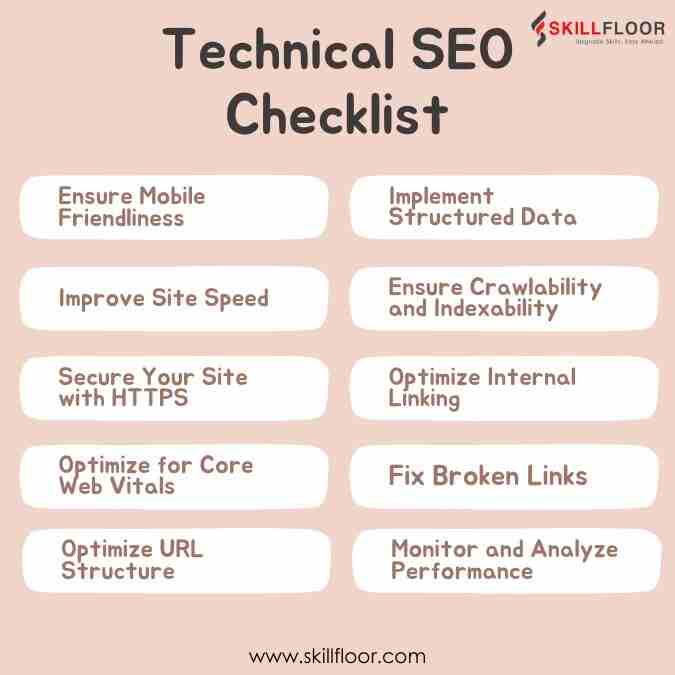
Technical SEO Checklist: Everything You Need to Rank Higher in 2026
1. Ensure Mobile Friendliness
Mobile-first indexing has become the standard. With mobile devices accounting for a substantial amount of web traffic, Google primarily indexes and ranks mobile content. To make your site mobile-friendly:
-
Responsive Design: Ensure that your website changes smoothly to multiple screen sizes.
-
Mobile Usability: Use tools such as Google's Mobile-Friendly Test to discover and resolve issues.
-
Touch-Friendly Elements: Make buttons and links easy to tap on smaller screens.
2. Improve Site Speed
Website speed affects both user experience and search rankings. Slow-loading pages can increase bounce rates and reduce conversions. Key steps for improving site speed include:
-
Optimize Images: Using programs like TinyPNG, you can compress images without losing quality.
-
Enable Browser Caching: Store portions of your website in users' browsers to minimize load times for repeat visitors.
-
Minimize HTTP Requests: Reduce the number of components on each page to reduce the number of queries to the server.
3. Secure Your Site with HTTPS
Security is a priority for search engines and users alike. Having a secure website not only protects user data but also positively impacts your rankings. Ensure your website is secure by:
-
SSL Certificate: Install an SSL certificate to switch your site from HTTP to HTTPS.
-
Mixed Content Issues: Avoid loading insecure content (HTTP) on secure pages (HTTPS).
4. Optimize for Core Web Vitals
Core Web Vitals are metrics related to speed, responsiveness, and visual stability. These metrics are now a part of Google's ranking criteria, making them essential for technical SEO:
-
Largest Contentful Paint (LCP): Measures loading performance. Aim for LCP to occur within 2.5 seconds of when the page starts loading.
-
First Input Delay (FID): Measures interactivity. Pages should have an FID of less than 100 milliseconds.
-
Cumulative Layout Shift (CLS): Measures visual stability. Maintain a CLS of less than 0.1 to ensure that the page doesn’t shift unexpectedly.
5. Optimize URL Structure
A precise and succinct URL structure assists search engines in determining the hierarchy of your website's content. The best strategies for URL optimization include:
-
Readable URLs: Use descriptive and keyword-rich URLs to help readers and search engines understand what the page is about.
-
Avoid Special Characters: Keep URLs clear and avoid using special characters, which can cause problems.
-
Use hyphens: Separate words in URLs instead of underscores.
6. Implement Structured Data
Structured data, also known as schema markup, helps search engines understand the content of your pages. It can also improve your search listings with detailed results:
-
Use Schema Markup: Include schema types that are related to your content, such as Articles, Reviews, and FAQs.
-
Validate Markup: Use tools such as Google's Rich Results Test to verify and validate your structured data.
7. Ensure Crawlability and Indexability
Search engines must crawl and index your website before it appears in search results. Ensure that there are no obstacles to this procedure by:
-
Submit Sitemap: To assist search engines locate your pages, create and submit a sitemap through Google Search Console.
-
Robots.txt: Use the robots.txt file to specify which pages or sections of your website search engines should not crawl. If you are not sure how to create one, then use a Robots.txt generator to get started.
-
Crawl Errors: Check Google Search Console regularly for crawl errors and resolve any issues that arise.
8. Optimize Internal Linking
Internal linking plays a vital role in distributing link equity throughout your site and guiding search engines to your important pages. Key strategies include:
-
Use Descriptive Anchor Text: Make sure the anchor text is relevant to the linked page’s content.
-
Avoid Orphan Pages: Ensure all pages are linked from at least one other page within your site.
-
Balance Link Depth: Important pages should be reachable within a few clicks from the homepage.
9. Fix Broken Links
Broken links can have a detrimental influence on both user experience and SEO. Regularly scan your site to identify and fix broken links:
-
Use Tools: Use tools like Screaming Frog to detect broken links on your website.
-
Redirects: Create 301 redirects for any pages that have been moved or deleted.
-
Update Internal Links: Fix any internal links that lead to broken sites.
10. Monitor and Analyze Performance
Continuous monitoring and analysis are critical for maintaining and improving your SEO efforts. Use these tools and approaches to keep track of your site's performance:
-
Google Analytics: Monitor your website's traffic, user behavior, and conversion rates.
-
Google Search Console: Track your site's position in Google search results, look for issues, and improve performance.
-
SEO Tools: Ahrefs, SEMrush, and Moz are examples of SEO tools that may be used to evaluate backlinks, track keyword ranks, and do site audits.
How Often Should I Update My XML Sitemap?
Every time significant content on your website changes, you should update your XML sitemap to help search engines find new pages, updated content, and eliminate URLs more quickly.
-
After Publishing Content: To speed up search engine discovery, update your XML sitemap each time a new blog post, landing page, or product is released.
-
Following Website Changes: Updated sitemaps are necessary for major website redesigns or modifications to the URL structure so that search engines can correctly interpret the changed page organization.
-
Removing Old Pages: You should remove any deleted or redirected pages from your XML sitemap to avoid crawl issues and search engine indexing confusion.
-
Updating Existing Content: Regularly refreshing key content makes it easier for search engines to find new pages, particularly when major changes are made to the content or structure.
-
Using Automatic Generation: When a website updates, the majority of contemporary CMS platforms automatically update XML sitemaps, minimizing manual labor and continuously increasing sitemap accuracy.
Top Technical SEO Tools for Better Website Performance
|
Technical SEO Area |
Most Used Tools |
Purpose |
|
Ensure Mobile Friendliness |
Google Mobile-Friendly Test |
Checks whether your website is mobile-friendly and identifies usability issues. |
|
Google Lighthouse |
Analyzes mobile performance, accessibility, and user experience. |
|
|
Improve Site Speed |
Google PageSpeed Insights |
Measures website speed and provides optimization suggestions. |
|
GTmetrix |
Tracks page load speed and highlights performance bottlenecks. |
|
|
Secure Your Site with HTTPS |
SSL Labs SSL Test |
Tests SSL certificate setup and website security configuration. |
|
Really Simple SSL |
Helps websites migrate smoothly from HTTP to HTTPS. |
|
|
Optimize for Core Web Vitals |
Google Search Console |
Monitors Core Web Vitals and website performance issues. |
|
WebPageTest |
Provides detailed insights into loading speed and page stability. |
|
|
Optimize URL Structure |
Screaming Frog SEO Spider |
Audits URL structure, redirects, and technical SEO issues. |
|
Ahrefs Site Audit |
Detects URL-related SEO problems and crawl issues. |
|
|
Implement Structured Data |
Google Rich Results Test |
Validates structured data and rich result eligibility. |
|
Schema Markup Validator |
Checks schema markup implementation accuracy. |
|
|
Ensure Crawlability and Indexability |
Google Search Console |
Tracks crawl errors, indexing status, and sitemap submissions. |
|
Sitebulb |
Performs detailed crawl analysis and technical SEO audits. |
|
|
Optimize Internal Linking |
Link Whisper |
Suggests internal linking opportunities to improve site structure. |
|
Screaming Frog SEO Spider |
Identifies orphan pages and internal link issues. |
|
|
Fix Broken Links |
Broken Link Checker |
Detects broken links affecting SEO and user experience. |
|
Screaming Frog SEO Spider |
Finds broken URLs, redirect chains, and server errors. |
|
|
Monitor and Analyze Performance |
Google Analytics 4 |
Tracks traffic, user behavior, and conversion performance. |
|
SEMrush |
Monitors rankings, backlinks, and overall, SEO performance. |
Common Technical SEO Mistakes
Technical SEO errors can have a detrimental effect on crawlability, indexing, rankings, and user experience, making it challenging for websites to see steady organic development.
-
Blocking Important Pages: Important pages may not be able to be crawled by search engines due to incorrect robots.txt settings, which hinders the proper indexing of vital website content.
-
Slow Website Speed: Website speed can be severely impacted by heavy scripts, poorly optimized pictures, and inadequate hosting, which can have a detrimental effect on rankings and user experience.
-
Broken Internal Links: Important pages are more difficult to find and crawl effectively when internal links are broken, causing problems for both visitors and search engines.
-
Incorrect Canonical Tags: Implementing canonical tags incorrectly can mislead search engines, leading to problems with duplicating content and decreasing the visibility of crucial website pages.
-
Poor Mobile Optimization: In mobile-first search contexts, websites that are not properly optimized for mobile devices may provide unpleasant user experiences, lower engagement, and impact rankings.
Frequently Asked Questions
1. Is technical SEO difficult to learn?
Technical SEO is not very difficult to learn, but it requires consistent practice and understanding of website structure, crawling, indexing, and performance basics.
2. Can technical SEO be done without coding knowledge?
Yes, many technical SEO tasks can be handled without coding knowledge using SEO tools and CMS plugins, though basic technical understanding is helpful.
3. How long does technical SEO take to show results?
Technical SEO improvements can show results within a few weeks, but significant ranking and indexing changes usually take one to three months.
4. Do small websites need technical SEO?
Yes, even small websites need technical SEO to ensure proper indexing, fast loading speed, and good user experience from the beginning.
5. What happens if technical SEO is ignored?
If technical SEO is ignored, websites may face crawling issues, poor rankings, slow indexing, and reduced visibility in search engine results.
As we are already in 2026, technical SEO has become even more important for building strong online visibility and sustainable organic growth. Following a technical seo checklist helps ensure your website stays fast, secure, and easy for search engines to crawl and understand. A well-planned technical seo checklist also improves user experience by fixing performance and indexing issues before they impact rankings. Keeping a consistent technical seo checklist allows your site to adapt to evolving search updates and user expectations. With a proper technical seo checklist, you can maintain better visibility, stronger performance, and steady long-term search growth.
Digital Marketing Course in Ahmedabad | Digital Marketing Course in Bangalore | Digital Marketing Course in Chennai | Digital Marketing Course in Coimbatore | Digital Marketing Course in Hyderabad | Digital Marketing Course in Pune | Digital Marketing Course in Delhi | Digital Marketing Course in Mumbai
Digital Marketing Courses in Other Locations in India
Ahmedabad | Aurangabad | Bangalore | Bhilai | Bhopal | Bhubaneshwar | Chandigarh | Chennai | Cochin | Coimbatore | Dehra Dun | Delhi | Faridabad | Ghaziabad | Gorakhpur | Guntur | Gurgaon | Guwahati | Hyderabad | Jaipur | Kanpur | Khammam | Kolkata | Lucknow | Madurai | Mumbai | Mysore | Nagpur | Noida | Patna | Pondicherry | Pune | Ranchi | Shimoga | Surat | Thane | Thiruvananthapuram | Tiruchirappalli | Tirupati | Vadodara | Visakhapatnam | Warangal | Jalandhar | Jodhpur | Indore | Durgapur | Jamshedpur | Dhanbad | Kota | Karnal | Udaipur | Amritsar | calicut | Nashik | Ludhiana | varanasi | thrissur | Mangalore | Raipur |