












































AutoML: Automating Machine Learning for Beginners
A beginner-friendly, engaging guide to AutoML—learn how automated machine learning removes barriers, saves time, and empowers anyone to build ML models easily.
Many people say, "This is amazing... but way too complex," when they consider machine learning. You're not by yourself. The majority of beginners are both thrilled and afraid by the math, code, and countless tools. For years, it seemed like something that only professionals could handle, with everyone else merely observing from the outside.
But the world has changed.
Thanks to AutoML (Automated Machine Learning), ML is now more than simply accessible; it's inviting. AutoML is evidence that you don't need to be a coding expert to create anything significant, regardless of your background—student, marketer, engineer, entrepreneur, or first-time tech enthusiast.
What is Machine Learning?
Computers can learn from data and improve their performance without being explicitly programmed, thanks to machine learning. We give examples rather than rigid rules, and the algorithm discovers patterns on its own. Over time, it makes technology wiser and more practical by powering commonplace features like voice assistants, spam filters, and recommendations.


Why Machine Learning Feels Scary at First
At first, machine learning may seem intimidating due to its complex jargon and challenging mathematics, but once you understand the fundamentals, it becomes far more approachable than anticipated.
Not because the concepts are impossible—but because for years, ML has been presented with:
-
Massive equations
-
Dense textbooks
-
Complex code
-
High learning curves
But here’s the truth few people say out loud:
Machine learning is difficult mostly because traditional ML workflows are overloaded with manual steps. A typical ML process includes:
-
Gathering data
-
Cleaning data
-
Engineering features
-
Selecting algorithms
-
Training models
-
Hyperparameter tuning
-
Evaluating accuracy
-
Deploying the model
So… What Exactly Is AutoML?
Automated Machine Learning, or AutoML for short, refers to methods and technologies that automate the application of machine learning to practical issues. AutoML takes care of data cleansing, hyperparameter adjustment, and algorithm selection without human intervention.
By automatically handling complicated tasks in the background, AutoML helps beginners create efficient machine learning models. It assesses data, chooses relevant algorithms, optimizes parameters, and produces robust findings, allowing users to focus more on understanding insights than on technical details.
Why AutoML Matters More Than Ever
According to McKinsey, AI adoption has doubled in the last five years, and roles requiring ML skills are growing 7x faster than traditional tech jobs.
1. AI Skills Rising
Nowadays, AI and ML are crucial job skills. Businesses want experts to comprehend them, particularly since machine learning models are becoming essential to daily choices in a variety of sectors.
2. Demand Growing Fast
The need for ML-powered solutions is growing rapidly as AI use has doubled in recent years. AutoML makes difficult activities easier, which helps reduce the skill gap.
3. Faster Insights Needed
Fast choices are now essential for businesses. Teams may more easily provide insights without waiting on knowledgeable data scientists because of AutoML's quick model building capabilities.
4. Easy Entry Point


Beginners who wish to learn ML without having to understand complex math or coding are empowered by AutoML. It breaks down obstacles and enables anyone to begin experimenting with confidence.
5. Boost for Professionals
AutoML gives busy professionals an advantage in fast-paced sectors by saving time, automating repetitive activities, and speeding up experimentation.
6. Future-Proof Skillset
ML projects are increasingly beginning with AutoML. Instead of wondering why you missed the shift later, learning it now can help you stay ahead.
How AutoML Works
AutoML automates the entire machine learning workflow. Let’s break it down step-by-step:
1. Automated Data Preprocessing
AutoML tools automatically:
-
Handle missing values
-
Encode categorical variables
-
Normalize or scale numerical values
-
Remove multicollinearity
-
Detect outliers
Together, these automatic preparation procedures ensure that the dataset is completely cleaned and prepared for training.
2. Automated Feature Engineering
Some AutoML frameworks even generate new features by:
-
Combining existing features
-
Interpreting date/time fields
-
Creating polynomial transformations
These automated feature engineering processes greatly increase model correctness without requiring users to possess specific knowledge.
3. Automated Model Selection
Instead of guessing which algorithm to use, AutoML tries multiple models such as:
-
Decision trees
-
Random forests
-
XGBoost
-
Neural networks
-
KNN
-
Logistic regression
In order to provide the greatest outcomes, it automatically assesses various algorithms and chooses the model that performs the best.
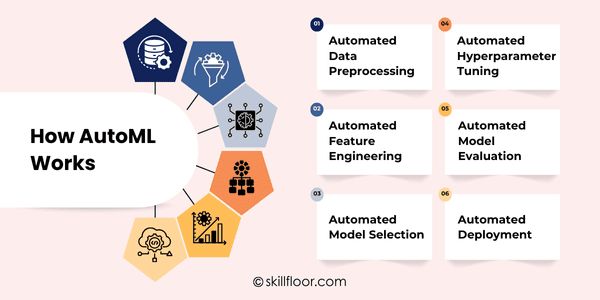
4. Automated Hyperparameter Tuning
AutoML performs:
-
Grid search
-
Random search
-
Bayesian optimization
-
Genetic algorithms
In order to consistently obtain the best performance for a particular task, these tuning strategies enhance model settings.
5. Automated Model Evaluation
AutoML automates the process of model evaluation by assessing various methods, comparing their accuracy, and selecting the best one for your dataset. This increases efficiency by streamlining the procedure, eliminating the need for manual evaluation of each strategy or metric.
Moreover, AutoML ensures fair comparisons within a machine learning framework by pairing each model with the appropriate measurements. This allows beginners and teams to quickly identify the most effective model without requiring extensive technical knowledge or time-consuming experimentation.
6. Automated Deployment
Some platforms allow one-click deployment, generating:
-
REST APIs
-
Downloadable model files
-
Inference dashboards
With the help of these deployment methods, models may be easily used in the real world without requiring complicated engineering work.
A Simple Workflow: How Beginners Can Use AutoML
These simple steps can help you begin using AutoML even if you have never constructed a model before:
Step 1: Prepare Your Dataset
Gather clean, organized data in a CSV file to ensure smooth processing during the AutoML workflow.
Example tasks:
-
Predict house prices
-
Identify spam emails
-
Classify flowers (Iris dataset)
Step 2: Load It into an AutoML Tool
Depending on the tool:
-
Upload via UI (Use the tool's UI to upload your dataset directly for a fast, easy, and beginner-friendly AutoML setup.)
-
Use Simple Code (Use a few simple Python lines to load your dataset when utilizing PyCaret or Auto-sklearn.)
Step 3: Select the Task
For effectively direct AutoML, decide what kind of machine learning task—classification, regression, or clustering—your dataset needs.
Step 4: Start the AutoML Run
The tool will:
-
Clean your data
-
Test multiple models
-
Tune parameters
Step 5: Review Top Models
AutoML will show ranked models based on performance.
You can compare:
-
Accuracy
-
ROC score
-
RMSE
-
Precision/recall
Step 6: Export or Deploy the Model
Most tools allow:
-
Downloading the model
-
Deploying as an API
-
Exporting code/notebooks for further exploration
Benefits of AutoML for Beginners
1. Low Entry Barrier
AutoML relieves the burden of learning intricate algorithms or fine-tuning procedures, making it simple for beginners to construct models without the need for advanced technical knowledge or prior data science expertise.
2. Saves Huge Time
Beginners can proceed more quickly and maintain motivation by completing tasks that typically take hours, such as testing algorithms or fine-tuning settings, in just a few minutes.
3. Accelerates Learning
Instead of only reading theory, beginners can better understand fundamental ML techniques by observing how AutoML chooses models, manages features, and increases accuracy.
4. Ideal for Prototyping
AutoML generates ready-to-use models rapidly, so you may explore possibilities without having to wait for lengthy manual setups when you want to test ideas quickly.
5. Strong Baselines Provided
AutoML is used by even experienced data scientists to produce trustworthy baseline models that direct future advancements, providing beginners with a solid foundation.
6. Reduces Overwhelm
By managing repetitive activities, AutoML simplifies complexity and frees up beginners to concentrate on comprehending insights, enhancing outcomes, and boosting machine learning confidence.
Limitations of AutoML
AutoML is strong, but it's not magic. Setting reasonable expectations helps by being aware of its limitations.
-
Not Full Knowledge: AutoML streamlines processes, but it cannot take the place of actual machine learning skills required to analyze data and enhance models.
-
Limited Custom Control: AutoML products limit customization for users who require more control over particular processes or advanced features because they adhere to established flows.
-
Black-Box Decisions: It is currently difficult to completely comprehend model selections or tuning decisions due to the lack of transparency offered by many AutoML platforms.
-
High Computing Needs: Strong hardware may be needed to run AutoML because testing various algorithms and fine-tuning settings rapidly uses a lot of processing power.
-
Not for Complex Tasks: Custom model designs are frequently required for extremely complicated jobs or specialized domains, which AutoML is unable to completely support or optimize.
-
Expectations Must Align: AutoML is useful, but in order to utilize it effectively and ethically today, novices must be aware of its limitations and align their expectations.
Popular AutoML Tools for Beginners
Easy-to-use interface, automated training, deployment, and monitoring for rapid machine learning experimentation are features of this beginner-friendly platform.
2. Microsoft Azure AutoML
Advanced settings are supported by this enterprise-ready solution, which also seamlessly connects with other Azure services to streamline workflows.
3. H2O AutoML
A powerful, quick, and open-source solution that strikes a good mix between customization choices and ease of use.
4. Auto-sklearn
Building on scikit-learn, this Python module automates model selection and optimization for effective machine learning development.
5. TPOT
Genetic programming is used by an AutoML tool to optimize ML pipelines, making it perfect for creative model discovery and experimentation.
6. MLJAR AutoML
Platform designed for beginners that provides easy-to-use interfaces and visually appealing outcomes to make models easier for users to understand.
7. PyCaret
For rapid model comparisons, training, and deployment operations, this lightweight Python package with an extremely simple syntax is ideal.
When to Use AutoML vs. Manual ML
Comparison Table
|
Scenario |
Use AutoML When… |
Use Manual ML When… |
|
Skill Level |
You’re a beginner or non-ML expert |
You have strong ML or domain expertise |
|
Time Requirement |
You need quick results or prototypes |
You have time for deeper experimentation |
|
Problem Type |
The task is standard (classification/regression) |
The task is complex or highly customized |
|
Customization |
Minimal customization is needed |
Full control over each step is required |
|
Performance Goal |
Good, efficient performance is acceptable |
Maximum fine-tuned performance is needed |
|
Interpretability |
You don’t need full model transparency |
You require clear explanations and full interpretability |
Use AutoML When:
You want quick, reliable results without deep ML knowledge.
You’re building a prototype or MVP.
Your problem fits common ML tasks (classification, regression, forecasting).
You want automation for preprocessing, model selection, and tuning.
You prefer simple, fast deployment options.
Use Manual ML When:
You need maximum control over your model and pipeline.
You’re solving a complex or highly domain-specific problem.
You want to customize algorithms, feature engineering, or hyperparameters deeply.
You’re working with large-scale, specialized datasets.
You need model interpretability and transparency for critical decisions.
Real-Life Examples: What AutoML Lets Beginners Build
Here's an example of what a beginner can actually accomplish using AutoML if you're still unsure:
1. House Price Prediction
Upload a dataset → AutoML → Get a model that predicts property prices.
Zero ML expertise needed.
2. Customer Churn Prediction
Feed customer behavior data → AutoML → Predict who’s likely to leave a service.
3. Email Classification
AutoML trains a model to categorize emails:
-
Spam
-
Important
-
Promotional
3. Basic Image Classification
Even without deep learning experience, AutoML can categorize images into labels.
FAQs About AutoML
Q1: Is AutoML suitable for beginners?
A: Yes. AutoML is designed to help beginners build models without deep technical knowledge.
Q2: Do I need coding skills?
A: Not always. Some tools are drag-and-drop, though basic Python helps for customization.
Q3: Can AutoML replace data scientists?
A: No. It saves time but humans are still needed for decisions, feature design, and interpretation.
Q4: Are AutoML models accurate?
A: Yes, often very good, but results depend on your data quality and the tool used.
Q5: Which AutoML tool should I use?
A: Popular ones include Google Cloud AutoML, H2O.ai, Auto-sklearn, and Microsoft Azure ML.
Q6: When to use AutoML vs. manual ML?
A: Use AutoML for quick builds or beginners; manual ML for full control or custom solutions.
AutoML is similar to having a helpful guide while you delve into the field of machine learning. It handles the challenging tasks so you can concentrate on trying new things, picking up new skills, and swiftly seeing results. It makes a difficult task understandable and even enjoyable for novices. You acquire confidence, learn how models operate, and develop beneficial skills by giving it a try. Starting with AutoML now gives you access to chances, initiatives, and ideas that you may have previously believed were unattainable.
Digital Marketing Courses in Other Locations in India
Ahmedabad | Aurangabad | Bangalore | Bhilai | Bhopal | Bhubaneshwar | Chandigarh | Chennai | Cochin | Coimbatore | Dehra Dun | Delhi | Faridabad | Ghaziabad | Gorakhpur | Guntur | Gurgaon | Guwahati | Hyderabad | Jaipur | Kanpur | Khammam | Kolkata | Lucknow | Madurai | Mumbai | Mysore | Nagpur | Noida | Patna | Pondicherry | Pune | Ranchi | Shimoga | Surat | Thane | Thiruvananthapuram | Tiruchirappalli | Tirupati | Vadodara | Visakhapatnam | Warangal | Jalandhar | Jodhpur | Indore | Durgapur | Jamshedpur | Dhanbad | Kota | Karnal | Udaipur | Amritsar | calicut | Nashik | Ludhiana | varanasi | thrissur | Mangalore | Raipur |